Make a Ringtone from Video
Choose a short moment from video or audio. Export MP3 for Android or GarageBand, or M4R for desktop sync. iPhone clips are limited to 30 seconds.
Source audio
100 MiB · 20 minSelect audio or video for your ringtone
Video or audio · 100 MiB · iPhone clips up to 30 seconds
or drop it here · up to 100 MiB / 20 minOutput settings
How to make a ringtone from a video
Select a clip on the waveform, preview it, then export MP3 or M4R.
- 01
Choose a video or audio file (up to 100 MiB) and select iPhone or Android.
- 02
Select the part you want, adjust the start and end, add fades if useful, and preview the clip.
- 03
Export MP3 for Android or GarageBand, or M4R for desktop sync. On iPhone, import MP3 into GarageBand and share it as a ringtone.
Example: make a 15-second ringtone from a video
Choose a saved video with sound. Set Start to 5 and End to 20 seconds, preview the selection, then choose Create Ringtone. Export MP3 for Android or for GarageBand on iPhone.
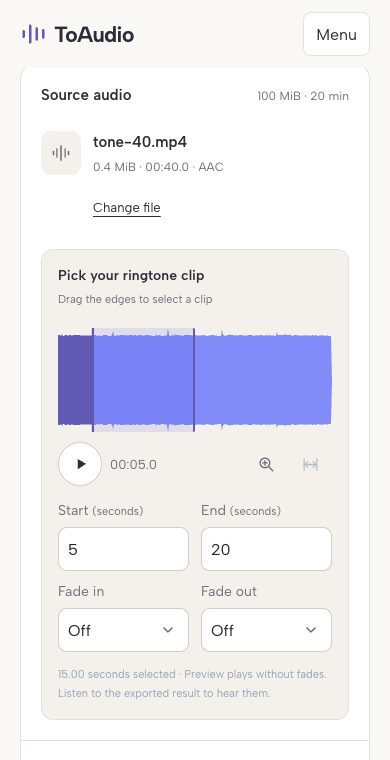
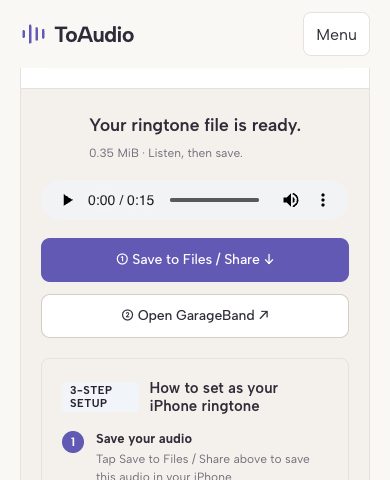
ToAudio shown in Chrome at mobile width with a test video. These screenshots show the website, not iPhone or Android system settings.
How to turn a video into a ringtone on iPhone
- Choose iPhone and keep your clip within 30 seconds. Export MP3 and save the downloaded audio in Files.
- In GarageBand on your iPhone, open an Audio Recorder project and switch to Tracks. Open the Loops browser, choose Files, and drag your saved MP3 to the start of the track.
- Return to My Songs, select the project, and choose Share → Ringtone. Name it, export, then choose Use sound as → Standard Ringtone.
How to make a video ringtone on Android
- Choose Android, trim the video, and export MP3. Listen to the result and download it to your phone.
- Open Settings → Sound & vibration → Ringtone and select your saved MP3 using the available file or custom-sound option. Menu names vary by phone.
- If the file is missing from the list, move it to the Ringtones folder, then open the ringtone picker again and save your selection.
Downloading a file does not set your ringtone automatically. Use MP3 for the GarageBand steps above; M4R is the alternative for desktop ringtone sync.
Tips for a better ringtone
- Choose a short, recognizable section.
- Avoid a very quiet introduction.
- Use fade in or fade out only when the cut sounds abrupt.
- Preview the selected clip before you export it.
Files stay on your device
Files are processed in your browser and are not uploaded to ToAudio.
Ringtone FAQ
Up to 100 MiB and 20 minutes per file. Short recordings work best on phones.
Can I turn a video link into a ringtone?
This video to ringtone converter works with files saved on your device, not pasted video links. Save a video you have permission to use, choose the local file here, then trim and export your ringtone.
Should I choose MP3 or M4R?
Choose MP3 for Android or GarageBand on iPhone. Choose M4R for desktop ringtone sync with Finder or iTunes. A downloaded M4R cannot be installed directly from Safari.
How do I make a ringtone from a video?
Choose a video, select a short section on the waveform, preview it, then select Create Ringtone to export the clip as MP3.
Can I make a ringtone from an MP4 file?
Yes. Common MP4 videos with a supported audio track work. Protected files or videos without audio cannot be used.
Can I make a ringtone on iPhone?
Yes. Save the exported MP3 to Files, import it into GarageBand, then share the project as a ringtone. The MP3 cannot be installed directly as an iPhone ringtone.
How long should a ringtone be?
A short, recognizable clip usually works best. The iPhone preset limits the selection to 30 seconds; Android supports a custom length.
Can I trim the video before creating the ringtone?
Yes. Drag the waveform selection or enter exact start and end times, then preview the chosen section before exporting.
Are my files uploaded?
No. The video is processed locally in your browser and is never uploaded to ToAudio servers.