Screen recording to MP3
Extract MP3 audio from a saved screen recording. Keep the full recording or trim a section.
Source audio
100 MiB · 20 minSelect a saved screen recording
Saved iPhone, Android or desktop recordings
or drop it here · up to 100 MiB / 20 minOutput settings
How to convert a screen recording to MP3
Extract audio from an existing screen recording. This tool does not record your screen.
Need audio from another video? Extract audio from a saved video.
- 01
Play your saved screen recording to check its sound, then tap Choose a file. The source must be no larger than 100 MiB and no longer than 20 minutes.
- 02
Keep the full recording or adjust Start and End in seconds using the open trim controls or waveform. Choose 128, 192, or 320 kbps MP3 quality.
- 03
Select Extract MP3, listen to the audio preview, then tap Download MP3. Keep this tab open until processing and your download finish.
Turn a screen recording into an audio file
On iPhone, choose your recording from Photos or save it to Files first. On Android, select the saved video from your gallery or Files. ToAudio extracts the sound already in that recording.
After processing, listen to the MP3 and use Download MP3. On iPhone, check Files → Downloads or Safari’s downloads list; on Android, check Chrome → Downloads or your Files app. Play the saved file to confirm the download finished.
If the original is silent, changing formats cannot restore missing sound. A missing audio track and a silent audio track are different: check the original recording before trying again.
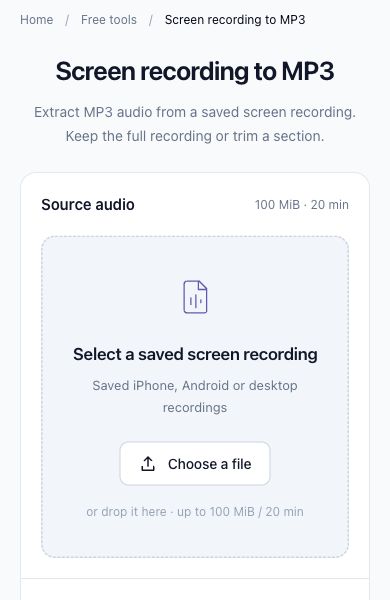
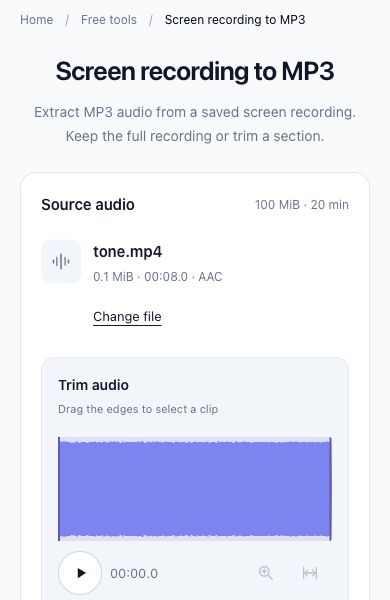
ToAudio shown in Chrome at mobile width, using a test recording. Your phone’s file picker and download screens may differ.
Files stay on your device
Files are processed in your browser and are not uploaded to ToAudio.
Frequently asked questions
Up to 100 MiB and 20 minutes per file. Short recordings work best on phones.
How do I convert a screen recording to MP3?
Choose a saved video with an audio track, keep the whole recording or select a section, and choose an MP3 bitrate. Select Extract MP3, check the preview, then download the audio file. ToAudio converts an existing recording; it does not record your screen.
How do I choose an iPhone screen recording and save the MP3?
iPhone screen recordings are saved in Photos. In Safari, tap Choose a file and select the saved recording using the photo or file option your device offers. After extraction, preview the sound and tap Download MP3. Find Safari downloads in the Files app’s Downloads folder. Available picker options, codec support, and memory vary by device and browser.
How do I use an Android screen recording?
Find the saved video in Photos or your phone’s gallery; on Google’s Android workflow, check Photos → Collections → On this device → Movies. Tap Choose a file here and select that local video. After extraction, tap Download MP3 and check Chrome’s Downloads or your Files app. Folder names and picker options can differ by phone.
Which screen recordings can I convert?
Local MP4, MOV, M4V, WebM, and MKV recordings are accepted when their audio track can be decoded. Each source file must be at most 100 MiB and 20 minutes. The file extension alone does not guarantee compatibility. Protected recordings and online video links are not supported.
Can I trim a screen recording before converting it?
Yes. The trim controls are open by default. Drag the waveform edges or enter Start and End times in seconds before extracting. The size and duration limits apply to the original file, so selecting a short section cannot bypass them. Shorten an oversized recording on your device first.
Does ToAudio upload my screen recording?
No. Conversion is free, requires no account, and processes your recording locally in the browser. First use downloads the processing engine, so an internet connection is needed to load it. Your media file is not uploaded.
Why does my screen recording have no audio?
Play the original first. “No audio track was found” means the file contains no audio stream; a recorded track can also be silent. Some apps block sound capture, and ToAudio cannot recover sound that was never recorded. If the original has sound but you see a decoding error, its codec may be unsupported or the file may be damaged or protected.
What should I do if processing fails?
If the engine cannot load, check your connection and choose the file again. If decoding fails, try an unprotected recording saved in another supported format. For slow processing or memory problems, use a smaller, shorter source and keep this tab open. Choosing a low MP3 bitrate reduces the output size, not the memory needed to read the source.
Phone recording and download help: iPhone recordings · iPhone downloads · Android recordings · Android downloads